
Dashboard — /
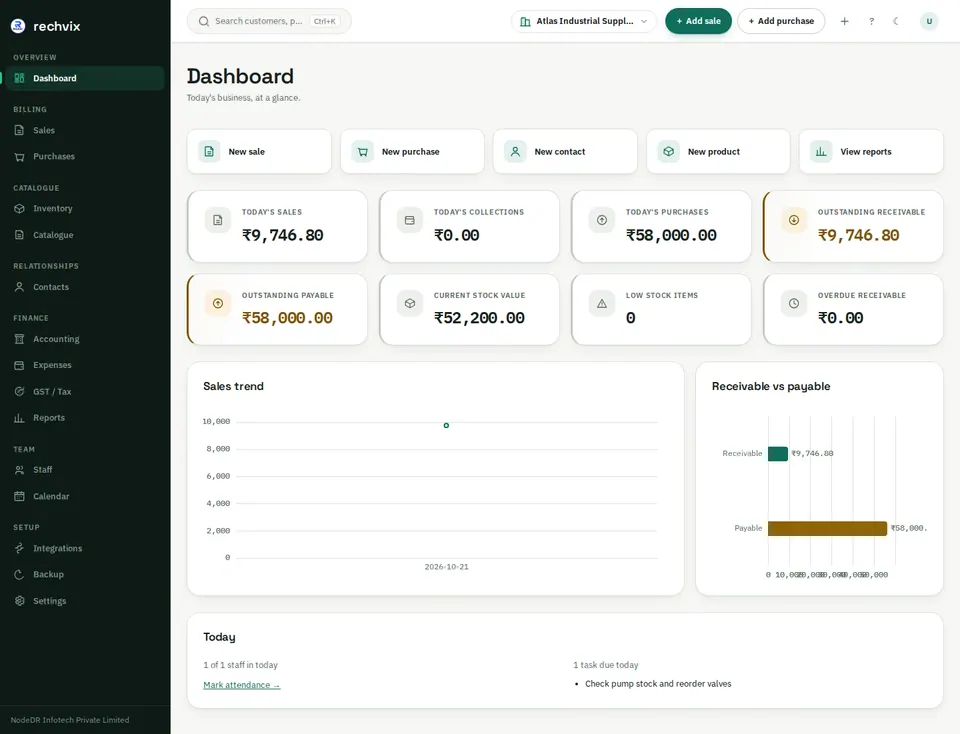
The dashboard summarizes today's sales, collections and purchases, outstanding receivables/payables, stock value, low-stock items and business trends. Sales and collections are different: an invoice can increase sales before the customer pays it.
Use New sale, New purchase, New contact, New product and View reports to begin common tasks. A new installation initially has empty or zero-valued panels; transactions populate them.
 Open image in a new tab
The desktop sidebar opens each main page. The top bar contains search, the company switcher, sale/purchase shortcuts, additional creation shortcuts, keyboard help, theme and account controls. Check the selected company before creating a document or downloading a tax package. Some accounting views are organisation-wide; do not assume every table is restricted by the company switcher.
Use Ctrl+K for global search, or open the search control. On the invoice screen, F2 focuses product search, F3 focuses customer search and Ctrl+Enter attempts finalization. Follow validation messages before retrying.